

bit.ly
Dropshare supports bit.ly as a native integration.
Follow this steps to set it up properly:
Open the Preferences and navigate to the Uploads tab. Select to use bit.ly as URL shortener.

Click on the configuration button and select the following preferences:
| Preference | Description |
|---|---|
| Generic Access Token: | Your Generic Access Token from bit.ly |
| Domain | Replace bit.ly with your personal domain which has been set up with bit.ly |
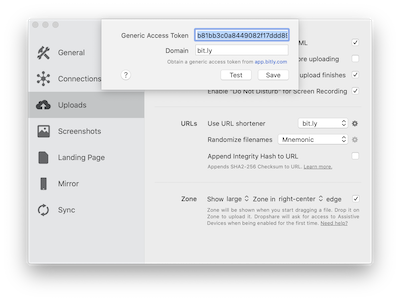
Click Test to validate your credentials and Save to close the dialog. That's it! From now on, Dropshare will use bit.ly to shorten your upload URLs.