

Dropshare is requesting to bypass the system private window picker and directly access your screen and audio
macOS 15+ might ask you from time to time whether you wish to allow Dropshare to record your screen and audio for capturing screen shots and screen recordings.
The dialog will look as follows:
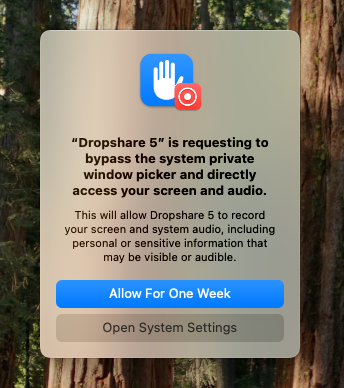
The dialog will appear even though you might have granted screen capture permissions before, and unfortunately, there is nothing at this point to avoid it showing from time to time officially. For an unofficial solution, please scroll down.
If you wish to continue to use Dropshare for capturing your screen for screen shots and screen recordings, please click "Allow For One Month".
INFO
For screen shots, Dropshare uses the macOS utility screencapture internally. For screen recordings, Dropshare uses the macOS API ScreenCaptureKit.